Form-16 OCR API
The following document highlights the details of the Form-16 OCR API.
API Description
Objective
The Form-16 OCR API extracts accurate information from a user's Form-16 document, including both its Part-A and Part-B sections, using optical character recognition(OCR). It returns the extracted data in a JSON format.
| Input | Output |
|---|---|
| An image or PDF file of the user's Form-16 document | The Form-16 data extracted from the document and converted into a JSON format. The complete list of output fields is provided under the Success Response Details section. |
API URL
https://ind-engine.thomas.hyperverge.co/v1/readForm16
API Endpoint
readForm16
Overview
The Form-16 OCR API is RESTful and uses standard HTTP verbs and status codes. The responses are in JSON format, and you should upload all images and files as form-data through a POST request.
Method - POST
Authentication
You need a unique pair of application ID ( appId ) and application key ( appKey ) from HyperVerge to verify your identity for accessing the Form-16 OCR API.
Headers
| Header | Mandatory / Optional | Description | Input Format |
|---|---|---|---|
| content-type | Mandatory | This parameter defines the media type for the request payload | multipart/form-data |
| appId | Mandatory | The application identifier shared by HyperVerge. You can find the details in the dashboard's credentials tab | This should be a unique value |
| appKey | Mandatory | The application key shared by HyperVerge. You can find the details in the dashboard's credentials tab | This should be a unique value |
| transactionId | Mandatory | Unique ID for the customer journey | Any defined unique value mapped to a transaction in your business ecosystem |
Inputs
The following table provides the details of the parameters required for the Form-16 OCR API's request body:
| Parameter | Mandatory / Optional | Type | Description | Input Format | Default Value |
|---|---|---|---|---|---|
image | Mandatory | file | The file containing the user's Form-16 document | Image file (JPEG, JPG, PNG) or PDF | Not Applicable |
Request
The following code snippet demonstrates a standard curl request for the Form-16 OCR API:
curl --location --request POST 'https://ind-engine.thomas.hyperverge.co/v1/readForm16' \
--header 'appid: <Enter_the_appId-Shared-by-HyperVerge>' \
--header 'appkey: <Enter_the_appKey-shared-by-HyperVerge>' \
--header 'transactionId : <Enter_the_Transaction_ID>' \
--form 'image=@"<path_to_image_file>"'
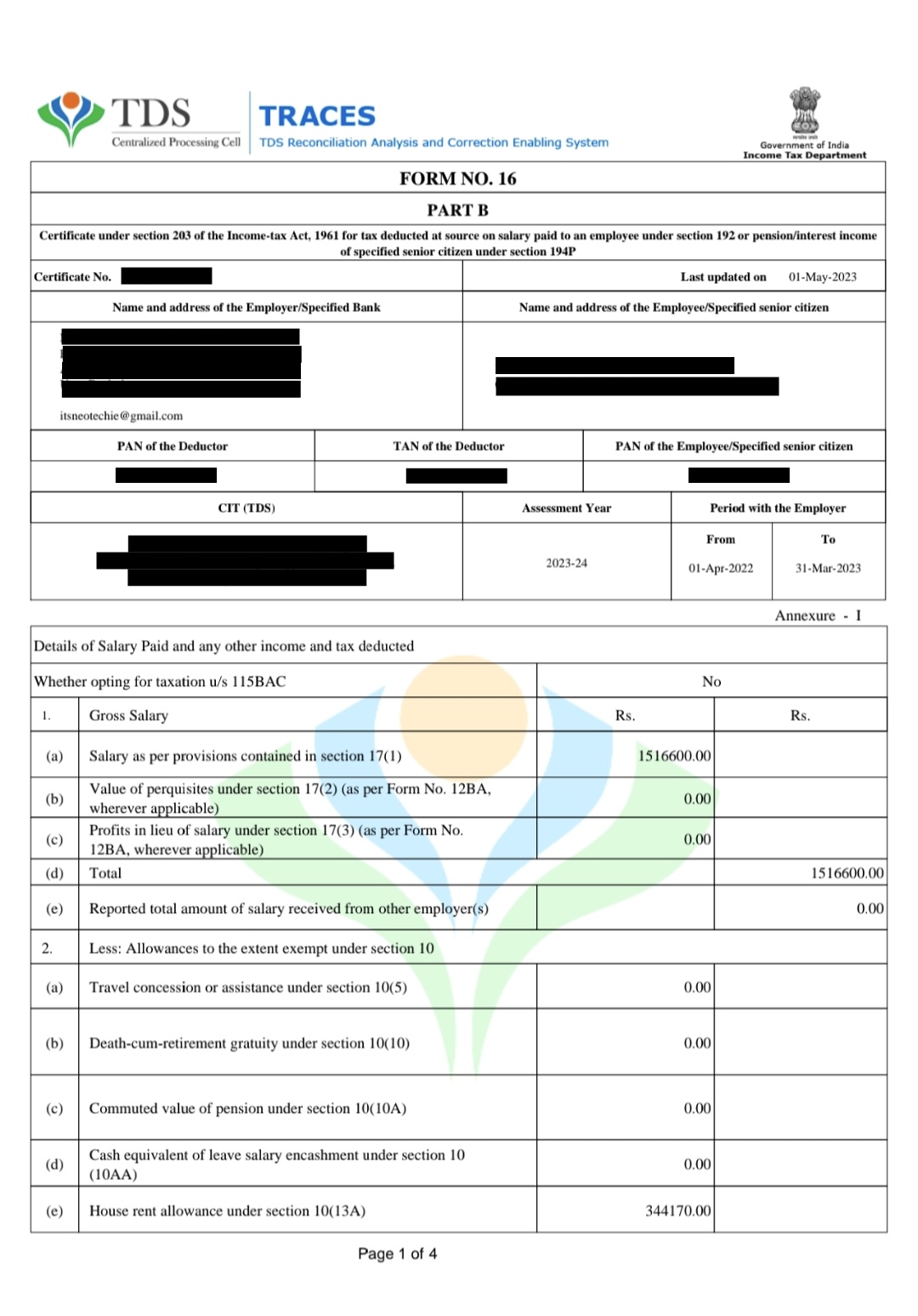
Document Sample
The following is a Form-16 Document:
Success Response
The following code snippet demonstrates a success response from the Form-16 OCR API:
{
  "status": "success",
  "statusCode": 200,
  "result": {
    "details": {
      "employeeName": {
        "value": "<Employee_Name>",
        "conf": 0.95
      },
      "panNumber": {
        "value": "<PAN_Number>",
        "conf": 0.98
      },
      "assessmentYear": {
        "value": "<Assessment_Year>",
        "conf": 0.99
      },
      "employerName": {
        "value": "<Employer_Name>",
        "conf": 0.96
      },
      "employerTAN": {
        "value": "<Employer_TAN>",
        "conf": 0.97
      },
      "grossSalary": {
        "value": "<Gross_Salary_in_INR>",
        "conf": 0.95
      },
      "totalDeductions": {
        "value": "<Total_Deductions_in_INR>",
        "conf": 0.95
      },
      "taxableIncome": {
        "value": "<Taxable_Income_in_INR>",
        "conf": 0.96
      },
      "totalTaxPaid": {
        "value": "<Total_Tax_Paid_in_INR>",
        "conf": 0.97
      }
    }
  },
  "metaData": {
    "requestId": "<Request_ID>",
    "transactionId": "<Transaction_ID>"
  }
}
Success Response Details
The following table outlines the details of the success response from the Form-16 OCR API:
| Parameter | Type | Description |
|---|---|---|
status | string | The status of the request |
statusCode | integer | The HTTP status code returned for the request |
result | object | Contains the extracted details from the Form 16 |
details | object | Contains the extracted fields with their values and confidence scores |
employeeName | object | The name of the employee |
panNumber | object | The PAN number of the employee |
assessmentYear | object | The year of assessing the user's tax deduction |
employerName | object | The name of the employer or specified bank |
employerTAN | object | The TAN number of the employer or specified bank |
grossSalary | object | The gross salary of the employee |
totalDeductions | object | The total deductions from the salary |
taxableIncome | object | The taxable income of the employee |
totalTaxPaid | object | The total tax paid by the employee |
metaData | object | Contains request and transaction identifiers |
requestId | string | A unique identifier for the request |
transactionId | string | A unique identifier for the transaction |
The response's field values reflect only the data recorded in the user's document.
Failure Response
The following code snippet demonstrates a failure response from the Form-16 OCR API:
{
  "status": "failure",
  "statusCode": 400,
  "error": "API call requires one input image"
}
Error Responses
The following are some error responses from the Form-16 OCR API:
- No Image Input
- Image Size Exceeds Limit of 6MB
- Document Not Detected
{
  "status": "failure",
  "statusCode": 400,
  "error": "API call requires one input image"
}
{
  "status": "failure",
  "statusCode": 400,
  "error": "Image size cannot be greater than 6MB"
}
{
  "status": "failure",
  "statusCode": 422,
  "error": "Document Not Detected"
}
Error Response Details
A failure or error response contains a failure status with a relevant status code and error message.
The following table lists all error responses:
| Status Code | Error Message | Error Description | Error Resolution |
|---|---|---|---|
| 400 | API call requires one input image | The request does not include an input image, which is mandatory for processing. | Ensure the request includes the image parameter with a valid image or PDF file |
| 400 | Image size cannot be greater than 6MB | The provided image exceeds the maximum allowed size of 6MB. | Reduce the image file size to 6MB or less before submitting the request |
| 422 | Document Not Detected | The system was unable to detect any document in the provided image. | Ensure the image contains a clear and visible Form-16 document, or contact the HyperVerge team if the issue persists |